Note
Go to the end to download the full example code.
Creating meshes with the mesh_gen object
There is a new (2026) interface to cr_trig_create,
crtomo.mesh_interface.CRTomoGMSHMeshGenerator.
This example present various ways to use this generator class.
Note
You can access the generator class in two ways: from
crtomo.mesh_interface import CRTomoGMSHMeshGenerator or using the
top-level module crtomo: from crtomo import
CRTomoGMSHMeshGenerator. There is also an already initialized instance of
the mesh loaded as crtomo.mesh_gen. In most cases, this instance is the
easiest way to use the generator.
The top level crtomo import suffices for most tasks
import crtomo
import numpy as np
Defining the mesh boundaries and electrode positions
Note
Always work clockwise when denoting boundary nodes!
# define the electrode positions
electrodes = np.array((
    (0, 0),
    (1, 0),
    (2, 0),
    (3, 0),
))

# define the boundary geometry
# the last number indicates the type of boundary element towards the next node
# 12: Neumann no-flow boundaries (for surface boundaries)
# 11: mixed boundary types (subsurface boundaries)
boundaries = np.array((
    (-1, 0, 12),
    (0, 0, 12),
    (1, 0, 12),
    (2, 0, 12),
    (3, 0, 12),
    (4, 0, 11),
    (4, -2, 11),
    (-1, -2, 11),
))
Mesh Generation
mesh = crtomo.mesh_gen.gen_mesh(
    boundaries,
    electrodes,
    char_lengths=[
        0.5,
        0.45,
        0.45,
        0.45,
    ],
)
_ = mesh.plot()
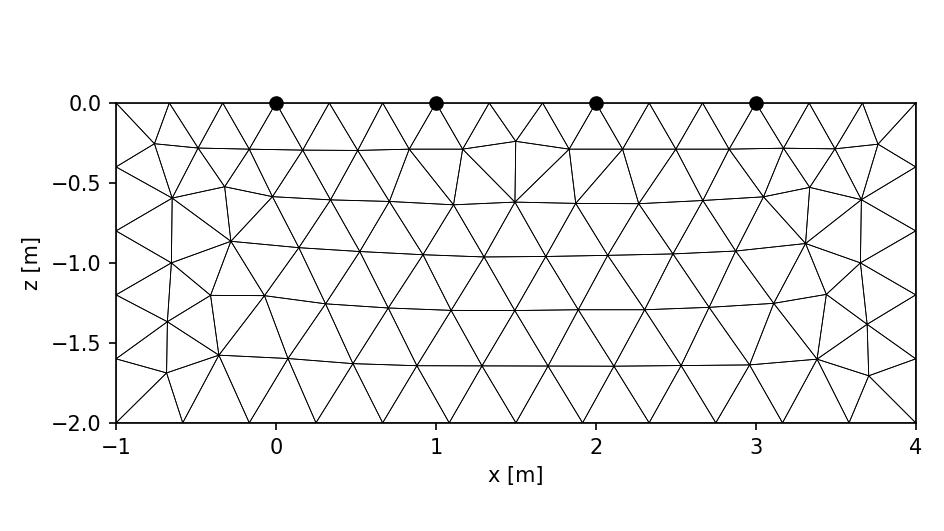
Calling the mesh generation routines...
   done
This grid was sorted using CutMcK. The nodes were resorted!
Triangular grid found